> ## Documentation Index
> Fetch the complete documentation index at: https://discord-platform-username.mintlify.site/llms.txt
> Use this file to discover all available pages before exploring further.
# Mobile
> Design and optimize Discord Activities for mobile devices.
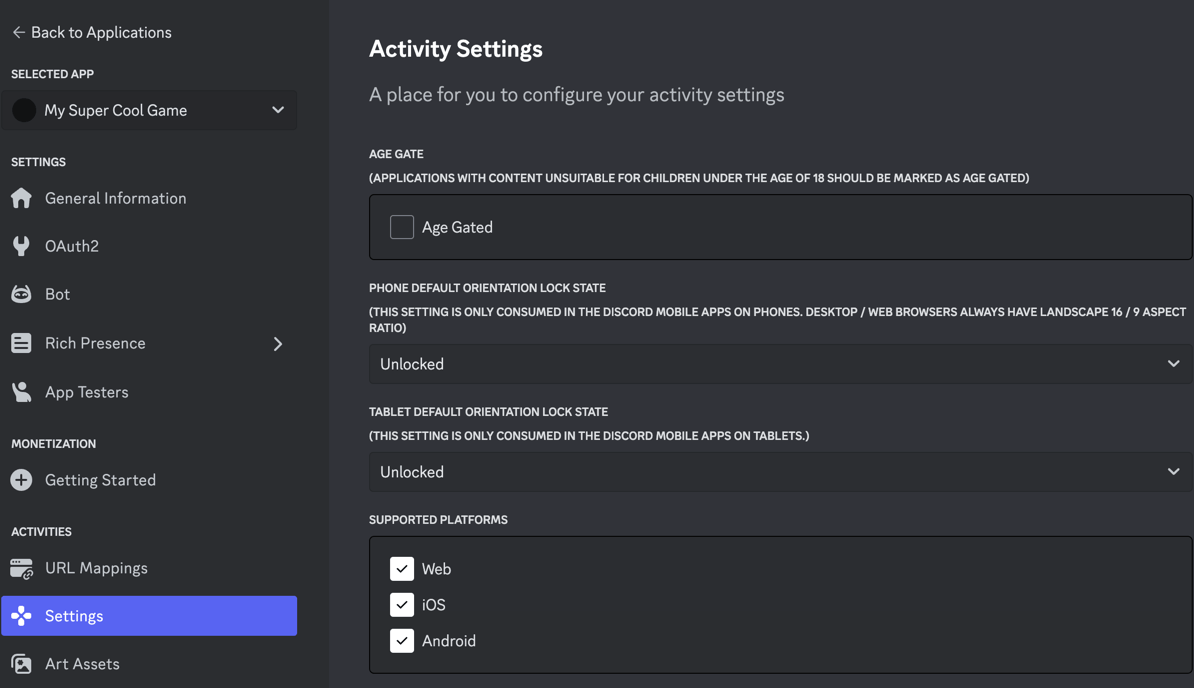
## Supported Platforms: Web, iOS, Android
By default, your Activity will be launchable on web/desktop. To enable or disable support for Web/iOS/Android, do the following:
* Visit the [developer portal](https://discord.com/developers/applications)
* Select your application
* Select [Activities -> Settings](https://discord.com/developers/applications/select/embedded/settings) in the left-side of the developer portal
* From check the appropriate checkboxes in the developer portal, and save your changes
 ***
## Mobile Safe Areas
As an example, you can define your safe area insets as below in CSS:
```css theme={null}
:root {
--sait: var(--discord-safe-area-inset-top, env(safe-area-inset-top));
--saib: var(--discord-safe-area-inset-bottom, env(safe-area-inset-bottom));
--sail: var(--discord-safe-area-inset-left, env(safe-area-inset-left));
--sair: var(--discord-safe-area-inset-right, env(safe-area-inset-right));
}
```
This prefers the `--discord-safe-area-inset-*` variable and will fallback to the env values for iOS + any local dev testing that is done outside of Discord.
You can then reference these values:
```css theme={null}
body {
padding-left: var(--sail);
padding-right: var(--sair);
padding-top: var(--sait);
padding-bottom: var(--saib);
}
```
***
## Mobile Thermal States
You may need to respond to thermal state changes using recommendations from [thermal states surfaced by mobile devices](https://developer.apple.com/library/archive/documentation/Performance/Conceptual/power_efficiency_guidelines_osx/RespondToThermalStateChanges.html) to improve the user experience.
Discord's Embedded App SDK provides an abstraction over [Apple's thermal state APIs](https://developer.apple.com/library/archive/documentation/Performance/Conceptual/power_efficiency_guidelines_osx/RespondToThermalStateChanges.html) and [Android's thermal state APIs](https://source.android.com/docs/core/power/thermal-mitigation#thermal-api).
Here's how Discord's abstraction maps to Apple's thermal states and Android's thermal states.
```javascript theme={null}
enum ThermalState {
NOMINAL = 0, // maps to "nominal" on iOS and "none" on Android
FAIR = 1, // maps to "fair" on iOS and "light" / "moderate" on Android
SERIOUS = 2, // maps to "serious" on iOS and "severe" on Android
CRITICAL = 3, // maps to "critical" on iOS and "critical" / "emergency" / "shutdown" on Android
}
```
The Embedded App SDK allows developers to subscribe to these thermal state changes.
```javascript theme={null}
const handleThermalStateUpdate = (update: {thermal_state: number}) => {
switch (thermalState) {
case Common.ThermalStateTypeObject.NOMINAL:
...
case Common.ThermalStateTypeObject.FAIR:
...
case Common.ThermalStateTypeObject.SERIOUS:
...
case Common.ThermalStateTypeObject.CRITICAL:
...
default:
...
}
}
discordSdk.subscribe('THERMAL_STATE_UPDATE', handleThermalStateUpdate);
```
Discord will publish the current thermal state upon event subscription, and it will also publish any thermal state changes that happen afterward.
On Android devices, the thermal state updates will only be available on Android 10 and higher.
***
## Mobile Safe Areas
As an example, you can define your safe area insets as below in CSS:
```css theme={null}
:root {
--sait: var(--discord-safe-area-inset-top, env(safe-area-inset-top));
--saib: var(--discord-safe-area-inset-bottom, env(safe-area-inset-bottom));
--sail: var(--discord-safe-area-inset-left, env(safe-area-inset-left));
--sair: var(--discord-safe-area-inset-right, env(safe-area-inset-right));
}
```
This prefers the `--discord-safe-area-inset-*` variable and will fallback to the env values for iOS + any local dev testing that is done outside of Discord.
You can then reference these values:
```css theme={null}
body {
padding-left: var(--sail);
padding-right: var(--sair);
padding-top: var(--sait);
padding-bottom: var(--saib);
}
```
***
## Mobile Thermal States
You may need to respond to thermal state changes using recommendations from [thermal states surfaced by mobile devices](https://developer.apple.com/library/archive/documentation/Performance/Conceptual/power_efficiency_guidelines_osx/RespondToThermalStateChanges.html) to improve the user experience.
Discord's Embedded App SDK provides an abstraction over [Apple's thermal state APIs](https://developer.apple.com/library/archive/documentation/Performance/Conceptual/power_efficiency_guidelines_osx/RespondToThermalStateChanges.html) and [Android's thermal state APIs](https://source.android.com/docs/core/power/thermal-mitigation#thermal-api).
Here's how Discord's abstraction maps to Apple's thermal states and Android's thermal states.
```javascript theme={null}
enum ThermalState {
NOMINAL = 0, // maps to "nominal" on iOS and "none" on Android
FAIR = 1, // maps to "fair" on iOS and "light" / "moderate" on Android
SERIOUS = 2, // maps to "serious" on iOS and "severe" on Android
CRITICAL = 3, // maps to "critical" on iOS and "critical" / "emergency" / "shutdown" on Android
}
```
The Embedded App SDK allows developers to subscribe to these thermal state changes.
```javascript theme={null}
const handleThermalStateUpdate = (update: {thermal_state: number}) => {
switch (thermalState) {
case Common.ThermalStateTypeObject.NOMINAL:
...
case Common.ThermalStateTypeObject.FAIR:
...
case Common.ThermalStateTypeObject.SERIOUS:
...
case Common.ThermalStateTypeObject.CRITICAL:
...
default:
...
}
}
discordSdk.subscribe('THERMAL_STATE_UPDATE', handleThermalStateUpdate);
```
Discord will publish the current thermal state upon event subscription, and it will also publish any thermal state changes that happen afterward.
On Android devices, the thermal state updates will only be available on Android 10 and higher.