> ## Documentation Index
> Fetch the complete documentation index at: https://discord-platform-username.mintlify.site/llms.txt
> Use this file to discover all available pages before exploring further.
# Poll Resource
> Reference for Discord poll objects and management endpoints.
export const Route = ({method, children}) => {
return
{method}
{children}
;
};
export const ManualAnchor = ({id}) => {
return ;
};
A poll is... well... a poll! It holds information about a poll!
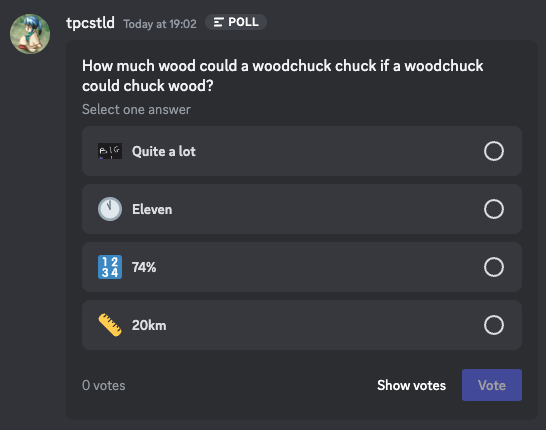 ### Poll Object
The poll object has a lot of levels and nested structures. It was also designed
to support future extensibility, so some fields may appear to be more complex than
necessary.
###### Poll Object Structure
| Field | Type | Description |
| ------------------ | --------------------------------------------------------------------------------------------------------- | --------------------------------------------------------------------- |
| question | [Poll Media Object](/developers/resources/poll#poll-media-object-poll-media-object-structure) | The question of the poll. Only `text` is supported. |
| answers | List of [Poll Answer Objects](/developers/resources/poll#poll-answer-object-poll-answer-object-structure) | Each of the answers available in the poll. |
| expiry | ?IS08601 timestamp | The time when the poll ends. |
| allow\_multiselect | boolean | Whether a user can select multiple answers |
| layout\_type | integer | The [layout type](/developers/resources/poll#layout-type) of the poll |
| results? | [Poll Results Object](/developers/resources/poll#poll-results-object-poll-results-object-structure) | The results of the poll |
`expiry` is marked as nullable to support non-expiring polls in the future, but all polls have an expiry currently.
### Poll Create Request Object
This is the request object used when creating a poll across the different endpoints.
It is similar but not exactly identical to the main [poll object](/developers/resources/poll#poll-object-poll-object-structure).
The main difference is that the request has `duration` which eventually becomes `expiry`.
###### Poll Create Request Object Structure
| Field | Type | Description |
| ------------------- | --------------------------------------------------------------------------------------------------------- | ---------------------------------------------------------------------------------------------- |
| question | [Poll Media Object](/developers/resources/poll#poll-media-object-poll-media-object-structure) | The question of the poll. Only `text` is supported. |
| answers | List of [Poll Answer Objects](/developers/resources/poll#poll-answer-object-poll-answer-object-structure) | Each of the answers available in the poll, up to 10 |
| duration? | integer | Number of hours the poll should be open for, up to 32 days. Defaults to 24 |
| allow\_multiselect? | boolean | Whether a user can select multiple answers. Defaults to false |
| layout\_type? | integer | The [layout type](/developers/resources/poll#layout-type) of the poll. Defaults to... DEFAULT! |
### Layout Type
We might have different layouts for polls in the future.
For now though, this number will be 1.
| Type | ID | Description |
| ------- | -- | ------------------------------ |
| DEFAULT | 1 | The, uhm, default layout type. |
### Poll Media Object
The poll media object is a common object that backs both the question and answers.
The intention is that it allows us to extensibly add new ways to display things in the future.
For now, `question` only supports `text`, while answers can have an optional `emoji`.
###### Poll Media Object Structure
| Field | Type | Description |
| ------ | --------------------------------------------------------- | ---------------------- |
| emoji? | partial [emoji](/developers/resources/emoji#emoji-object) | The emoji of the field |
`text` should always be non-null for both questions and answers, but please do not depend on that in the future.
The maximum length of `text` is 300 for the question, and 55 for any answer.
When creating a poll answer with an emoji, one only needs to send either the `id` (custom emoji) or `name` (default emoji) as the only field.
### Poll Answer Object
The `answer_id` is a number that labels each answer.
As an implementation detail, it currently starts at 1 for the first answer and goes up sequentially.
We recommend against depending on this sequence.
Currently, there is a maximum of 10 answers per poll.
###### Poll Answer Object Structure
| Field | Type | Description |
| ------------ | --------------------------------------------------------------------------------------------- | ---------------------- |
| answer\_id\* | integer | The ID of the answer |
| poll\_media | [Poll Media Object](/developers/resources/poll#poll-media-object-poll-media-object-structure) | The data of the answer |
\* Only sent as part of responses from Discord's API/Gateway.
### Poll Results Object
In a nutshell, this contains the number of votes for each answer.
The `results` field may be not present in certain responses where, as an implementation detail, we do not fetch the poll results in our backend.
This should be treated as "unknown results", as opposed to "no results". You can keep using the results if you have previously received them through other means.
Also due to the intricacies of counting at scale, while a poll is in progress the results may not be perfectly accurate.
They usually are accurate, and shouldn't deviate significantly -- it's just difficult to make guarantees.
To compensate for this, after a poll is finished there is a background job which performs a final, accurate tally of votes.
This tally concludes once `is_finalized` is `true`. Polls that have ended will also always contain results.
If `answer_counts` does not contain an entry for a particular answer, then there are no votes for that answer.
###### Poll Results Object Structure
| Field | Type | Description |
| -------------- | --------------------------------------------------------------------------------------------------------------------- | --------------------------------------------- |
| is\_finalized | boolean | Whether the votes have been precisely counted |
| answer\_counts | List of [Poll Answer Count Object](/developers/resources/poll#poll-results-object-poll-answer-count-object-structure) | The counts for each answer |
###### Poll Answer Count Object Structure
| Field | Type | Description |
| --------- | ------- | ---------------------------------------------- |
| id | integer | The `answer_id` |
| count | integer | The number of votes for this answer |
| me\_voted | boolean | Whether the current user voted for this answer |
# Poll Endpoints
For creating a poll, see [Create Message](/developers/resources/message#create-message). After creation, the poll message cannot be edited.
Apps are not allowed to vote on polls. No rights! :)
## Get Answer Voters
/channels/[\{channel.id}](/developers/resources/channel#channel-object)/polls/[\{message.id}](/developers/resources/message#message-object)/answers/[\{answer\_id}](/developers/resources/poll#poll-answer-object)
Get a list of users that voted for this specific answer.
###### Query String Params
| Field | Type | Description | Default |
| ------ | --------- | ------------------------------------- | ------- |
| after? | snowflake | Get users after this user ID | absent |
| limit? | integer | Max number of users to return (1-100) | 25 |
###### Response Body
| Field | Type | Description |
| ----- | ------------------------------------------------------- | ------------------------------- |
| users | array of [user](/developers/resources/user#user-object) | Users who voted for this answer |
## End Poll
/channels/[\{channel.id}](/developers/resources/channel#channel-object)/polls/[\{message.id}](/developers/resources/message#message-object)/expire
Immediately ends the poll. You cannot end polls from other users.
Returns a [message](/developers/resources/message#message-object) object. Fires a [Message Update](/developers/events/gateway-events#message-update) Gateway event.
### Poll Object
The poll object has a lot of levels and nested structures. It was also designed
to support future extensibility, so some fields may appear to be more complex than
necessary.
###### Poll Object Structure
| Field | Type | Description |
| ------------------ | --------------------------------------------------------------------------------------------------------- | --------------------------------------------------------------------- |
| question | [Poll Media Object](/developers/resources/poll#poll-media-object-poll-media-object-structure) | The question of the poll. Only `text` is supported. |
| answers | List of [Poll Answer Objects](/developers/resources/poll#poll-answer-object-poll-answer-object-structure) | Each of the answers available in the poll. |
| expiry | ?IS08601 timestamp | The time when the poll ends. |
| allow\_multiselect | boolean | Whether a user can select multiple answers |
| layout\_type | integer | The [layout type](/developers/resources/poll#layout-type) of the poll |
| results? | [Poll Results Object](/developers/resources/poll#poll-results-object-poll-results-object-structure) | The results of the poll |
`expiry` is marked as nullable to support non-expiring polls in the future, but all polls have an expiry currently.
### Poll Create Request Object
This is the request object used when creating a poll across the different endpoints.
It is similar but not exactly identical to the main [poll object](/developers/resources/poll#poll-object-poll-object-structure).
The main difference is that the request has `duration` which eventually becomes `expiry`.
###### Poll Create Request Object Structure
| Field | Type | Description |
| ------------------- | --------------------------------------------------------------------------------------------------------- | ---------------------------------------------------------------------------------------------- |
| question | [Poll Media Object](/developers/resources/poll#poll-media-object-poll-media-object-structure) | The question of the poll. Only `text` is supported. |
| answers | List of [Poll Answer Objects](/developers/resources/poll#poll-answer-object-poll-answer-object-structure) | Each of the answers available in the poll, up to 10 |
| duration? | integer | Number of hours the poll should be open for, up to 32 days. Defaults to 24 |
| allow\_multiselect? | boolean | Whether a user can select multiple answers. Defaults to false |
| layout\_type? | integer | The [layout type](/developers/resources/poll#layout-type) of the poll. Defaults to... DEFAULT! |
### Layout Type
We might have different layouts for polls in the future.
For now though, this number will be 1.
| Type | ID | Description |
| ------- | -- | ------------------------------ |
| DEFAULT | 1 | The, uhm, default layout type. |
### Poll Media Object
The poll media object is a common object that backs both the question and answers.
The intention is that it allows us to extensibly add new ways to display things in the future.
For now, `question` only supports `text`, while answers can have an optional `emoji`.
###### Poll Media Object Structure
| Field | Type | Description |
| ------ | --------------------------------------------------------- | ---------------------- |
| emoji? | partial [emoji](/developers/resources/emoji#emoji-object) | The emoji of the field |
`text` should always be non-null for both questions and answers, but please do not depend on that in the future.
The maximum length of `text` is 300 for the question, and 55 for any answer.
When creating a poll answer with an emoji, one only needs to send either the `id` (custom emoji) or `name` (default emoji) as the only field.
### Poll Answer Object
The `answer_id` is a number that labels each answer.
As an implementation detail, it currently starts at 1 for the first answer and goes up sequentially.
We recommend against depending on this sequence.
Currently, there is a maximum of 10 answers per poll.
###### Poll Answer Object Structure
| Field | Type | Description |
| ------------ | --------------------------------------------------------------------------------------------- | ---------------------- |
| answer\_id\* | integer | The ID of the answer |
| poll\_media | [Poll Media Object](/developers/resources/poll#poll-media-object-poll-media-object-structure) | The data of the answer |
\* Only sent as part of responses from Discord's API/Gateway.
### Poll Results Object
In a nutshell, this contains the number of votes for each answer.
The `results` field may be not present in certain responses where, as an implementation detail, we do not fetch the poll results in our backend.
This should be treated as "unknown results", as opposed to "no results". You can keep using the results if you have previously received them through other means.
Also due to the intricacies of counting at scale, while a poll is in progress the results may not be perfectly accurate.
They usually are accurate, and shouldn't deviate significantly -- it's just difficult to make guarantees.
To compensate for this, after a poll is finished there is a background job which performs a final, accurate tally of votes.
This tally concludes once `is_finalized` is `true`. Polls that have ended will also always contain results.
If `answer_counts` does not contain an entry for a particular answer, then there are no votes for that answer.
###### Poll Results Object Structure
| Field | Type | Description |
| -------------- | --------------------------------------------------------------------------------------------------------------------- | --------------------------------------------- |
| is\_finalized | boolean | Whether the votes have been precisely counted |
| answer\_counts | List of [Poll Answer Count Object](/developers/resources/poll#poll-results-object-poll-answer-count-object-structure) | The counts for each answer |
###### Poll Answer Count Object Structure
| Field | Type | Description |
| --------- | ------- | ---------------------------------------------- |
| id | integer | The `answer_id` |
| count | integer | The number of votes for this answer |
| me\_voted | boolean | Whether the current user voted for this answer |
# Poll Endpoints
For creating a poll, see [Create Message](/developers/resources/message#create-message). After creation, the poll message cannot be edited.
Apps are not allowed to vote on polls. No rights! :)
## Get Answer Voters
/channels/[\{channel.id}](/developers/resources/channel#channel-object)/polls/[\{message.id}](/developers/resources/message#message-object)/answers/[\{answer\_id}](/developers/resources/poll#poll-answer-object)
Get a list of users that voted for this specific answer.
###### Query String Params
| Field | Type | Description | Default |
| ------ | --------- | ------------------------------------- | ------- |
| after? | snowflake | Get users after this user ID | absent |
| limit? | integer | Max number of users to return (1-100) | 25 |
###### Response Body
| Field | Type | Description |
| ----- | ------------------------------------------------------- | ------------------------------- |
| users | array of [user](/developers/resources/user#user-object) | Users who voted for this answer |
## End Poll
/channels/[\{channel.id}](/developers/resources/channel#channel-object)/polls/[\{message.id}](/developers/resources/message#message-object)/expire
Immediately ends the poll. You cannot end polls from other users.
Returns a [message](/developers/resources/message#message-object) object. Fires a [Message Update](/developers/events/gateway-events#message-update) Gateway event.